
ErgoCare — gentle reminders to move, stretch and rest your eyes at work
ErgoCare is a free Chrome extension that reminds you to look after your body during a desk-job day. It offers three reminders — eye routine, drink water and physical movement — each switched on or off and set to your own interval in minutes. It links to curated stretch and eye-exercise videos and includes a 10-point desk setup checklist. It collects no data, and your settings stay on your computer.
Updated October 2026
The problem people live around
Desk work asks your body to hold the same position, and your eyes the same distance, for hours. People know they should move, stretch and look away, and mostly they forget until something hurts. The apps that do remind you tend to be countdown timers that add pressure to a day that already has plenty, and when they do prompt a stretch, you are left searching for one that actually suits a stiff neck or tired eyes.
What ErgoCare makes simpler
- Remembering to move, because reminders arrive on your own schedule, not when you happen to think of it.
- Working without a clock in the corner — the status card says how long you have been active rather than counting down.
- Knowing what to do when a reminder appears, with stretch and eye-exercise videos from curated health channels a click away.
- Setting up your desk, using a 10-point self-assessment checklist and video covering screen, chair, keyboard and posture.
- Staying out of the way, because it pauses when your computer sleeps and resets if you have been away for more than 20 minutes.
What you can do now that was harder before
You can build small, regular breaks into a desk-bound day without watching a timer, and go straight from a reminder to a stretch or eye exercise that is worth doing.
How it works
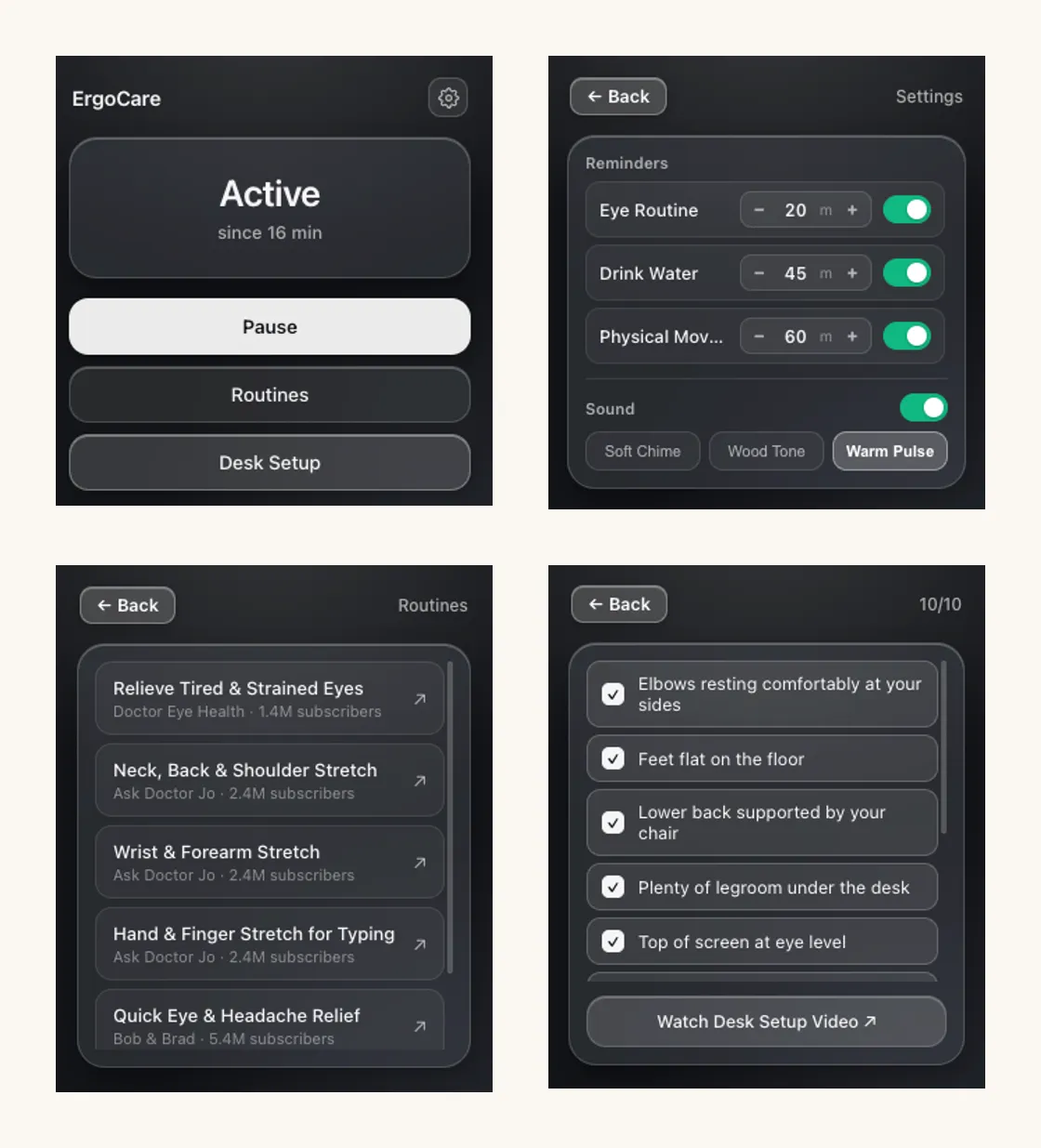
ErgoCare sits in the Chrome toolbar. A calm status card shows how long you have been active, instead of a countdown, so there is no sense of a deadline running out. Three reminders are available — Eye Routine, Drink Water and Physical Movement. Each one can be switched on or off and given its own interval in minutes, so you keep the ones that suit your day and silence the rest.
When a reminder fires, you can have a soft sound with it: Soft Chime, Wood Tone or Warm Pulse, each with an instant preview, or no sound at all. The timers are sensible about real life. They pause when your computer goes to sleep or on standby, and they reset if you have been inactive for more than 20 minutes, so you are not nagged to stand up when you already left.
For the break itself, ErgoCare links to stretch and eye-exercise videos from a curated set of health channels, including Doctor Eye Health, Ask Doctor Jo, Bob & Brad, E3 Rehab and Mayo Clinic. The 10-point desk setup checklist and its video help you check your screen, chair, keyboard and posture. According to its listing, ErgoCare needs no access to your browsing history or the sites you visit, collects no data and keeps your settings and timers on your own device.
What the AI does, and doesn't
None. There is no AI in ErgoCare. The reminders are simple timers you configure, and the videos are links to existing channels chosen in advance. Nothing about how you work is analysed, and nothing is sent anywhere.
Limitations
Knowing where a tool stops is what makes the part that works trustworthy. These are written before launch, not after complaints.
- It is a reminder, not a posture tracker. It cannot tell whether you actually stood up, how you are sitting, or how your eyes feel.
- It does not diagnose or treat anything, and it cannot say which exercises are right for your body.
- The videos come from outside channels. ErgoCare links to them but does not make them, and a good video is not the same as advice for your condition.
- It is a Chrome extension only. There is no Firefox, Safari, Edge-store or mobile version yet.
- Reminders follow your computer's activity, so they will not know about time spent away from it, such as a meeting on the other side of the office.
Who it's for
- Anyone who spends most of the day at a computer and forgets to move, drink water or rest their eyes.
- People who find countdown timers stressful and want a quieter nudge.
- Anyone setting up a home or office desk who would like a checklist to work through.
- Not for anyone with pain, injury or a diagnosed condition looking for treatment — that needs a professional, not a timer.
What it does not replace
A physiotherapist, an occupational health assessment, an optometrist, or a doctor. ErgoCare reminds you to take small breaks and points you to general stretch and eye-exercise videos. It does not assess your posture, diagnose a problem, or tell you what to do about pain.
Why we built it this way
Break reminders usually fail in one of two ways. They are either so easy to dismiss that they stop meaning anything, or they feel like a clock running down, which makes a stressful day slightly more stressful. ErgoCare is built around a quieter idea: tell you how long you have been active, nudge you on a schedule you chose, and then get out of the way.
The second half of the problem is what to do when the nudge arrives. A reminder to stretch is of little use if you then have to search for a stretch that is safe and sensible. So each break is paired with something worth doing, from a curated set of channels, and the desk checklist deals with the cause as well as the symptom. It is deliberately small and does only that.
Questions about ErgoCare
What does ErgoCare do?
It reminds you to look after yourself during a desk-job day. You get three reminders — eye routine, drink water and physical movement — each switched on or off and set to its own interval in minutes. It also links to curated stretch and eye-exercise videos and includes a 10-point desk setup checklist.
Does ErgoCare track what I do or collect my data?
According to its Chrome Web Store listing, no. The developer states it collects no user data and needs no access to your browsing history or the sites you visit. Your settings and timers stay on your own device, and there is no account to create. You can read the listing's privacy details before you install.
Will it keep reminding me when I am away from my computer?
No. Timers pause when your computer goes to sleep or on standby, and they reset if you have been inactive for more than 20 minutes. The idea is that a reminder to stand up is only useful if you have been sitting. The status card shows how long you have been active rather than counting down.
Where do the stretch and eye-exercise videos come from?
From a curated set of existing health channels, including Doctor Eye Health, Ask Doctor Jo, Bob & Brad, E3 Rehab and Mayo Clinic. ErgoCare links to them rather than making its own. They are general guidance, not advice for your situation, so stop if something hurts and speak to a professional if it persists.